PayPal Activity

Product Design, UX Research, Fintech

Reimagining how 200M+ PayPal users understand their transactions — from a flat, chronological feed to a tool that reflects how they actually think about their money.

PayPal processes payments for over 200 million users worldwide, but its Activity feed treats every transaction the same — a chronological list that works fine for casual users and falls apart for anyone who's using PayPal as part of their work.

My role was to research the problem space, design toward the opportunity, and prototype the solution. Grounded in real conversations with freelancers who knew exactly where the Activity feed got in the way.

Role Product Designer, UX Researcher
Duration 6 weeks (Dec'25 — Jan'26)

01 — The Problem

A feed that treats every transaction the same way.

Problem Statement

For freelancers using PayPal personal, there is no way to organize transactions by intent.

The feed is chronological by design. Useful for confirming a payment went through. Less useful for understanding what your side income actually looks like.
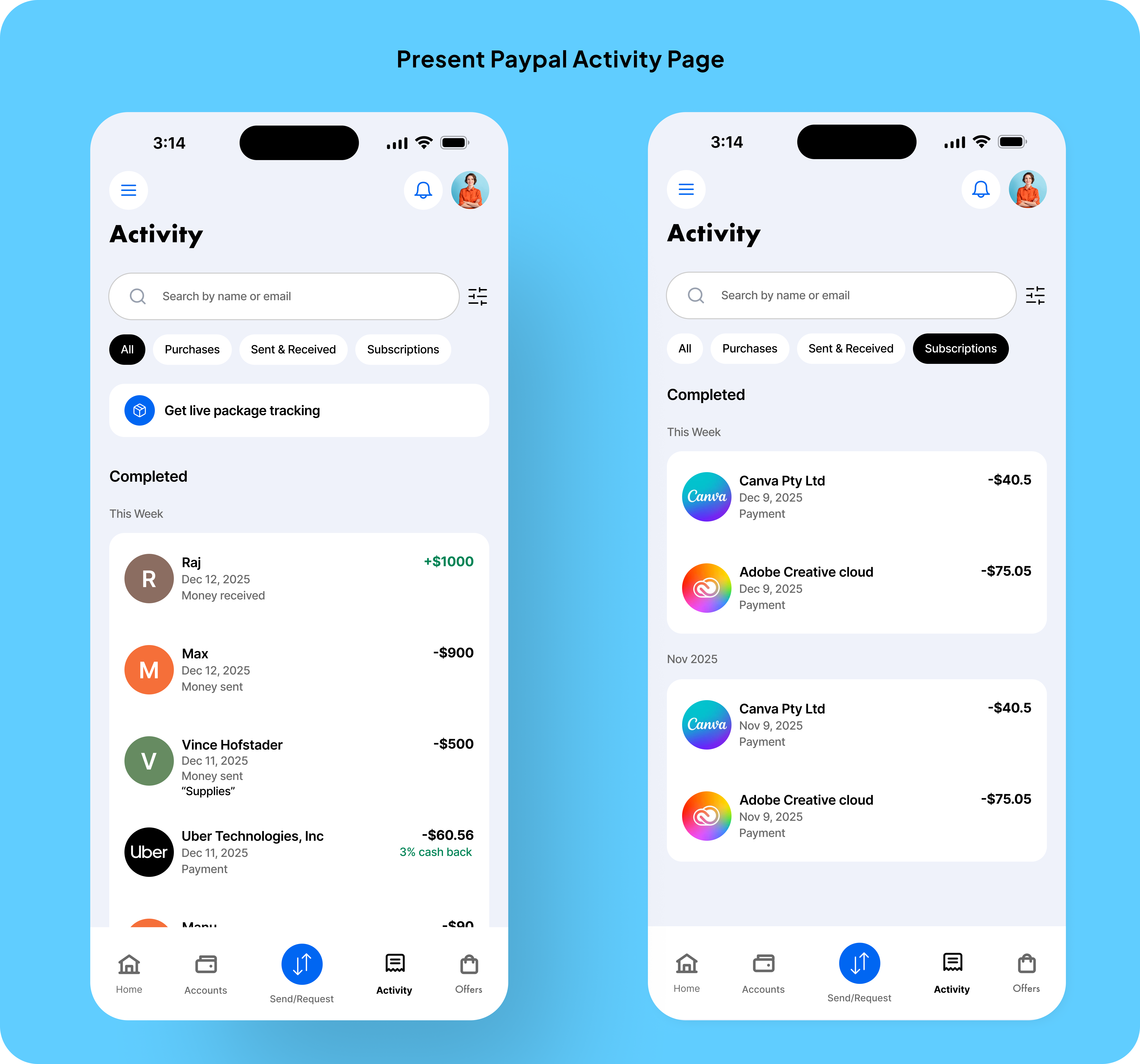
Current PayPal Activity feed — chronological list of transactions on iPhone mockups

The current PayPal Activity page — with predefined filters.

200M+

PayPal accounts globally, many used for side income without a business account

8–10

Freelancers and small-business owners interviewed during early research

3rd-party

Most participants relied on a spreadsheet or another app to make sense of PayPal
02 — Research

Listening to people who outgrew "personal" but resisted "business."

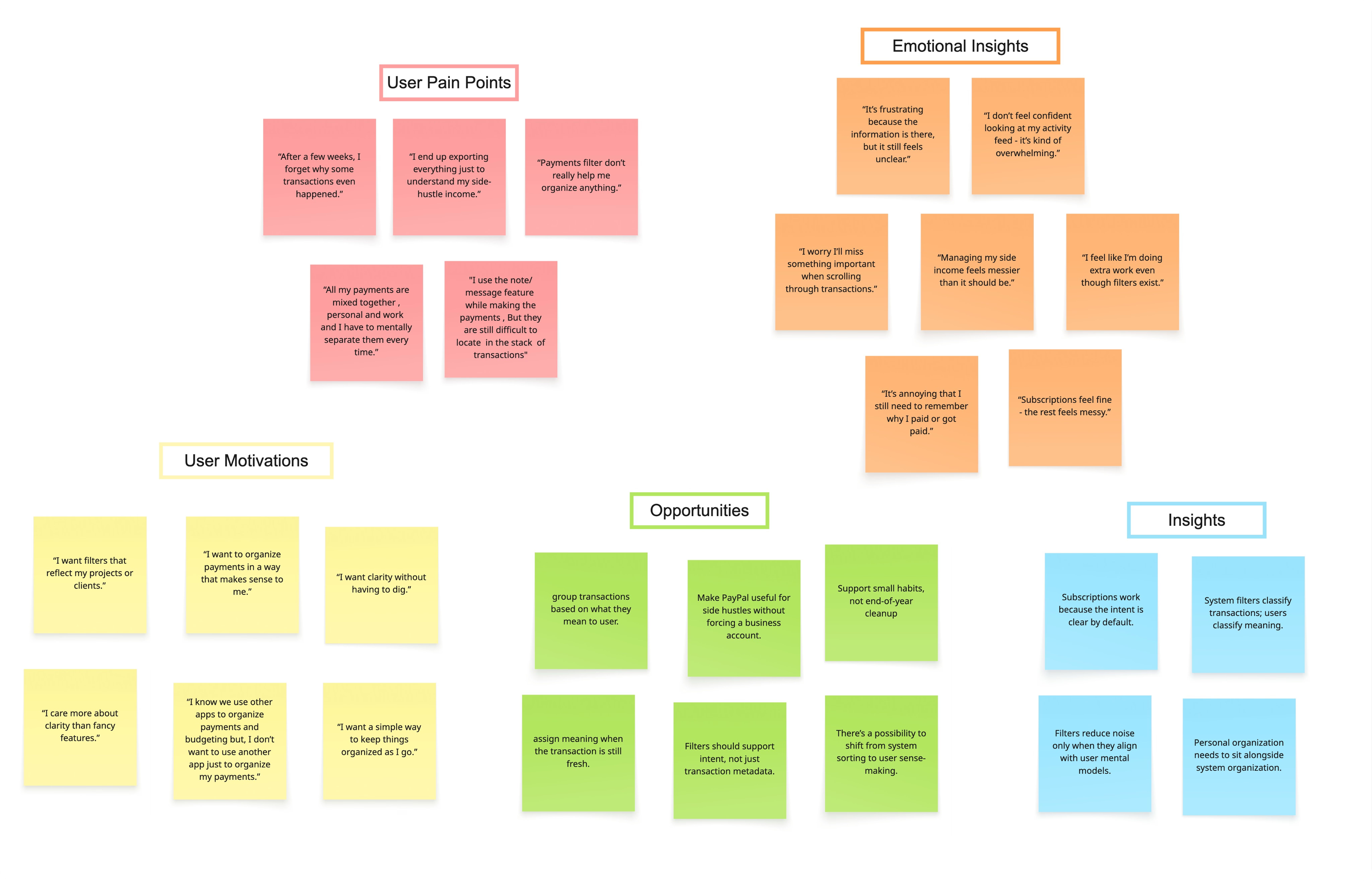
Affinity map synthesizing user insights from interviews with freelancers

Affinity map — synthesis from interviews with 8–10 freelancers.

I spoke with 8–10 people who run side-hustles through PayPal (wedding photographers, freelance illustrators, a tutor, a home-baker, a small-batch jewelry seller). None of them used PayPal Business; the barrier wasn't price, it was overhead.

What they wanted was strikingly small: a way to mentally separate their side-money from their personal money, without a second account or a new tool.

  • 01

    "I just want to see what I earned from photo gigs this month, without doing math in my head."

  • 02

    "I copy transactions into a Google Sheet every Sunday, it's the worst part of my week."

  • 03

    "PayPal already knows everything. It just doesn't let me organize it the way I think."

03 — The Core Insight

Financial clarity isn't about more data — it's about respecting how users already think about their money.

Every freelancer I talked to had already done the categorization mentally. They knew which payments were for which project, which expenses were business-adjacent, which were personal. The tool just didn't let them externalize it without leaving the app.

The opportunity wasn't to automate categorization — most people distrust auto-tagging in financial contexts. It was to give them a lightweight, manual way to mark intent at the moment they understood it best: the moment the transaction happened.

04 — Design Direction

Framing the problem before drawing pixels.

Before sketching any UI, I leaned on two framings to make sure I was solving the right thing.

JTBD

The job, in their words

When managing both personal and side-hustle payments, freelancers want to understand their financial activity clearly, without exporting data or mentally reconstructing what each transaction was for.

HMW

The design opportunity

How might we let users intentionally assign meaning to transactions inside the Activity feed, without requiring a business account or introducing complex financial tools?

PRINCIPLE

Manual by design

In financial UIs, automation erodes trust. Keep categorization manual but make the gesture invisible: one tap, no friction, no second-guessing.

05 — The Solution

User-Curated Collections.

Collections are user-defined groupings inside the Activity feed — like playlists, but for money. Users create a Collection (say, "C1 payments"), then assign transactions to it as they happen, or in bulk from the feed.

Collections live alongside system filters, never replacing them.

The redesigned Activity feed, with a user-created "C1 payments" collection.

Key task flows

FLOW 01

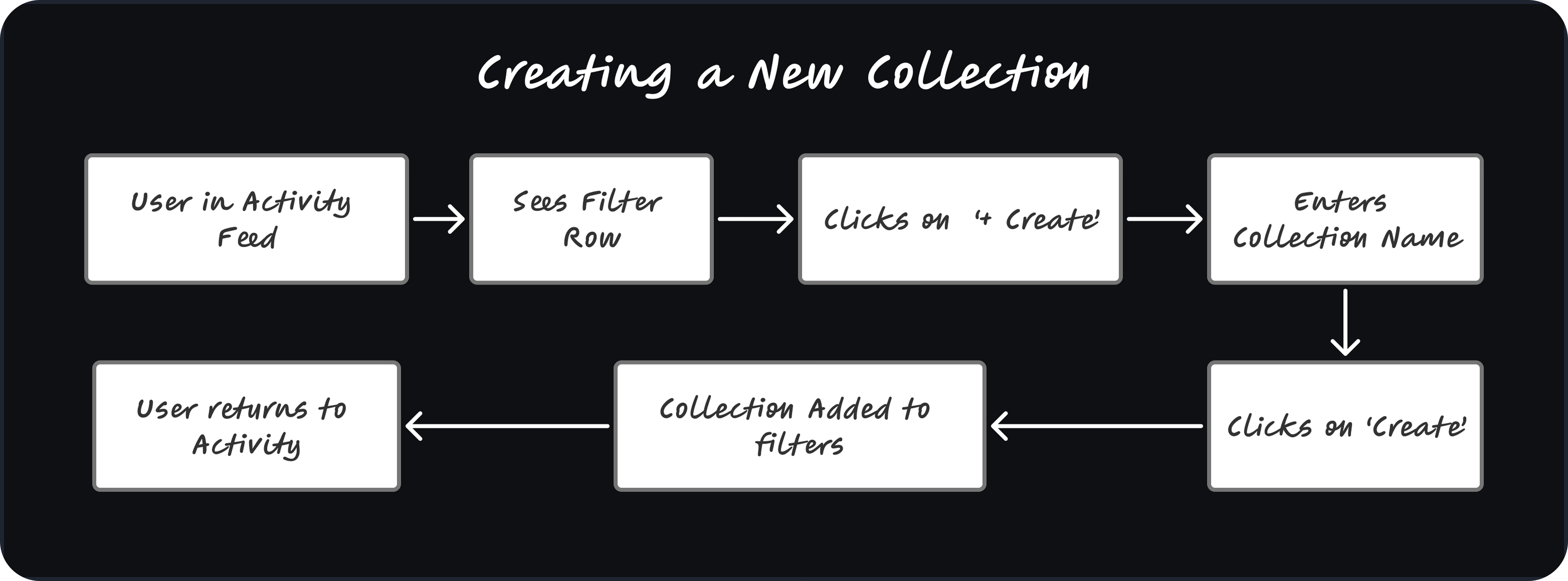
Creating a new Collection

From the Activity feed, users tap "New Collection," name it, optionally pick a color, and start adding. No setup wizard, no required fields beyond a name. The whole flow takes under 10 seconds.

Flow diagram: creating a new Collection in PayPal Activity

FLOW 02

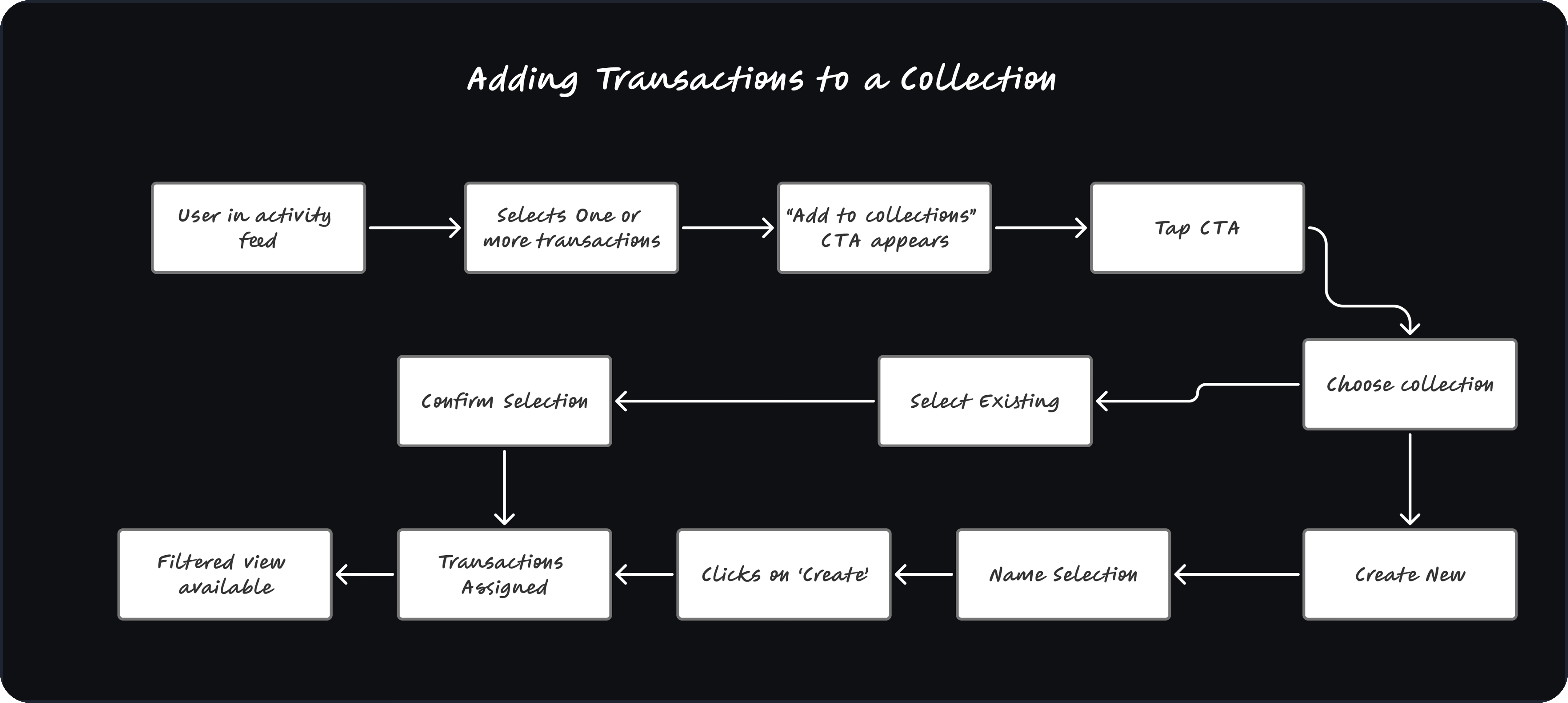
Adding transactions to a Collection

Each transaction row gets a single-tap "Add to Collection" affordance. Users can also long-press to multi-select and bulk-assign — a deliberate nod to power users who want to catch up on a month of unsorted activity.

Flow diagram: adding transactions to an existing Collection

Before & after

BEFORE

AFTER

06 — Iteration

From create-first to transaction-first.

After building out the first concept, I shared it with a few of the freelancers from the original interviews. The feedback flipped my thinking.

INITIAL DIRECTION

Create a collection first add transactions later

FINAL ITERATION

Select transactions first create or assign in context

What users said

PARTICIPANT 01

"I wanted to organize the payment while looking at it."

PARTICIPANT 02

"Setting up a folder before knowing what goes in it felt backwards."

PARTICIPANT 03

"I just wanted to deal with it in the moment — not plan ahead."

Organization behavior is reactive, not proactive.

Why the new flow works: it reduces upfront decision-making and aligns the interaction with how users actually think about their money, in the moment they're already looking at a payment, not in a planning step they have to remember to do later.

07 — Impact

What freelancers said when they used it.

PARTICIPANT 01

"I wouldn't need a separate app or spreadsheet anymore."

PARTICIPANT 02

"This makes PayPal feel like it understands how I actually use it."

PARTICIPANT 03

"I can finally see my project payments in one place."

Why this matters for PayPal.

01

A working surface, not a record

Collections turn the Activity feed from passive history into an everyday tool, increasing daily engagement.

02

Less churn to third-party tools

Users no longer need Mint, YNAB, or a Sunday-night spreadsheet to make sense of their side income.

03

A softer on-ramp to Business

Users self-identify as semi-pro through their own collection names, long before being asked to commit to a Business account.

04

Signals for future personalization

Collection names and frequency become behavioral signals that could power smart suggestions, without violating trust.

08 — What I Learned

Financial clarity isn't just about accurate data, it's about respecting user intent.

— Closing reflection

The hardest part of this project wasn't the design, it was resisting the urge to over-build. Every freelancer I spoke with had been burned by an app that tried to auto-categorize their finances and got it subtly wrong.

The lesson: in financial tools, restraint is a feature. Manual gestures, framed well, can feel like agency rather than work.