02 — Research
A survey, then seven conversations.
After fall onboarding, Penn State surveyed more than 300 incoming freshmen with one open question: what would have made your transition easier?
The pattern was consistent. Students weren't unhappy with the resources themselves. They were unhappy with finding them, understanding them, and knowing who to contact. We followed up with 7 one-on-one interviews to hear the friction in their own words.
"My radiator was making this awful noise and I had no idea who to tell. Is that Housing? Facilities? My RA? I spent 20 minutes figuring out who even owns the problem before I could report it."
"We got these long PDFs about campus resources. I just wanted a straight answer. I didn't want to open a 40-page document every time I had a simple question."
"I called three different numbers before someone told me UHS was where I needed to go. It took 45 minutes to make a 10-minute appointment."
"Penn State has CATA Go, the White Loop, the Blue Loop, the Link, the Nittany Express. I had no clue which one to take. A senior told me about half of these weeks in."
What the research synthesized to
01
Students had the information, but couldn't find the right resource the moment they needed it.
02
Fragmentation across departments created confusion about who to even contact.
03
Every extra step, another website, call, or PDF, increased the odds they gave up entirely.
03 — The Insight
The real problem wasn't missing information. It was the burden of knowing where to look.
The realization
Every friction point traced back to the same root. Students knew what they needed. They just didn't know where it lived, or who owned it.
The direction
The fix wasn't a better directory or more information. It was taking the burden of navigation off the student entirely. One place. Plain language. A real answer.
04 — Why Conversational
A chat assistant wasn't the obvious answer.
Before committing to a conversational interface, we looked hard at the more conventional fixes. Each one left the core problem untouched.
✕ A better directory
Reorganizes the fragmentation, but a student still has to know which category their problem belongs to before they can use it.
✕ A campus search engine
Only as good as the keywords typed. It can't answer "who do I even tell about my broken radiator?"
✕ A comprehensive guide
The onboarding PDFs already were one. Students described them as a dump of links and ignored them.
Every alternative assumed the student already knows what to look for.
But today's students already live in conversational interfaces. Describing a need in plain language is second nature.
ChatGPT
iMessage
Instagram DMs
WhatsApp
Snapchat
So "my heat isn't working" should be enough. No knowing it's a Housing issue, no hunting for the right portal. The shift from "know where to look" to "just ask" is what made conversation the right answer, not just a fashionable one.
05 — Conversational Architecture
Multi-flow conversation design.
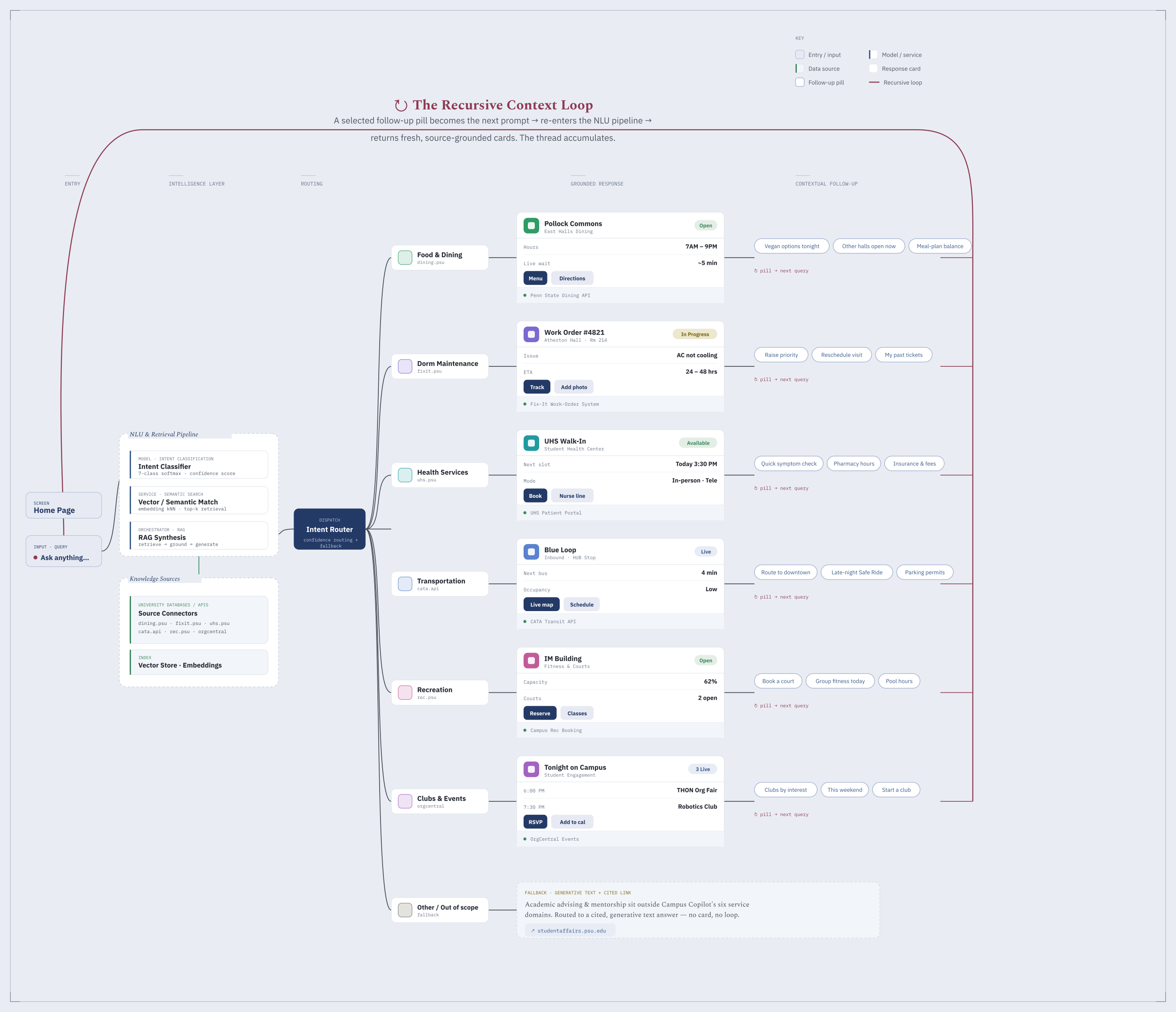
Architected a comprehensive conversation system with six core user journeys, each optimized for a different service.
Every category, from dining to maintenance to transportation, has its own conversation flow with tailored prompts, decision points, and response shapes. The flowchart maps how a student's question routes to the right journey and resolves into an actionable answer.
06 — Approach
Before the UI, the rules of the conversation.
Conversation design starts with behavior, not screens. Before designing a single card, I defined how the assistant should think, respond, and know its limits.
The principle that held it together
Every answer should be scannable, actionable, sourced, and honest about its limits. Zero dead-ends.
The process
Research
→
Define role & scope
→
Write the response contract
→
Map the flows
→
Design the UI
The response contract
Every message the assistant sends falls into one of three response types. Defining these up front meant the experience stayed predictable, no matter what a student asked.
Type 01
Structured
An in-scope question returns info cards: labelled rows, a status badge, actions, and a source.
Type 02
Greeting
A hello or a vague opener gets a friendly welcome and the six category chips to guide the next step.
Type 03
Graceful decline
Anything off-topic gets an honest "that's not my lane" and a pointer elsewhere, never a confident guess.
07 — The Solution
One chat. Six categories. Real answers.
Ask in plain language and the answer comes back not as a wall of text, but as something you can act on.
These six aren't buried in a menu. They're the first thing a student sees, so no one faces a blank box wondering what to ask. Anything outside them is gracefully declined, never guessed at, and the same model is built to expand as access to more services opens up.
Food & Dining
Dorm Maintenance
Health Services
Transportation
Recreation
Clubs & Events
A short recording demonstrating a few of the conversation flows in action.
Anatomy of an answer
Every response is built from the same atomic unit, a structured card designed to deliver the next action, not just information.
What it shows
01Title + location
What it is, where it is.
02Status badge
Open / 24/7 / Live. Exactly three labels, no variants.
03Detail rows
Each fact on its own line for fast scanning.
South Dining Hall
Pollock Halls
OPEN
Hours 7:00 AM – 9:00 PM
Today Breakfast · Lunch · Dinner
Directions
View menu
ⓘ Source: dining.psu.edu
Meal plan balance
Late-night options
What you can do
04CTA buttons
Directions, Call, Book Appt. Actions a link can't perform.
05Source citation
The verified PSU link, shown as a reference not a button.
06Follow-up chips
AI-generated next steps, surfaced below the card.
Built for every moment
Students reach for this walking to class, between shifts, or in bed before an alarm, on whatever device is in their hand.
So it's built fully responsive, from a wide desktop down to a phone, where the sidebar becomes a slide-over and the input bar pins to the bottom like a native messaging app.
08 — Iteration
The cards weren't the first idea. Students made them necessary.
We tested the first working version with students on three real tasks. Most of the feedback was positive, but a few comments made us rethink how an answer should be shaped. The same question, answered two very different ways, shows what changed.
Before
What dining halls are open right now?
South Dining Hall in Pollock is generally open for breakfast, lunch, and dinner on weekdays, though hours vary on weekends and during breaks. You can find the full schedule on the dining website, and you may want to call ahead since private events occasionally close the hall. Meal plans are accepted, and a campus map is available online…
After
What dining halls are open right now?
South Dining Hall
Pollock Halls
OPEN
Hours 7:00 AM – 9:00 PM
Today Breakfast · Lunch · Dinner
Directions
View menu
ⓘ Source: dining.psu.edu
Meal plan balance
Late-night options
"Just tell me my options and what I can do from here."
Drove the cards. We shifted from delivering information to delivering the next action: labelled rows, a status badge, and buttons.
"Instead of telling me to go to the website, just let me do it from here."
Drove the follow-up chips and CTAs. Each answer now ends with contextual next steps and actions that work without leaving the chat.
09 — Craft
The details that don't show up in a demo.
The difference between a polished product and a generic one lives in the small rules you hold yourself to. These are a few I designed against.
Open
24/7
Live
Exactly three status labels. No "Open Now," no synonyms. A fixed vocabulary keeps every card scannable.
Directions
Call
Reserve
Three button levels. A button never repeats the source link, only actions a link can't perform.
One token system. Synced across light, dark, code, and Figma, so nothing drifts.
Hours7:00 AM – 9:00 PM
TodayBreakfast · Lunch · Dinner
LocationPollock Halls
Each fact on its own line. No two details share a line, because uneven visual weight slows scanning.